About UserPass
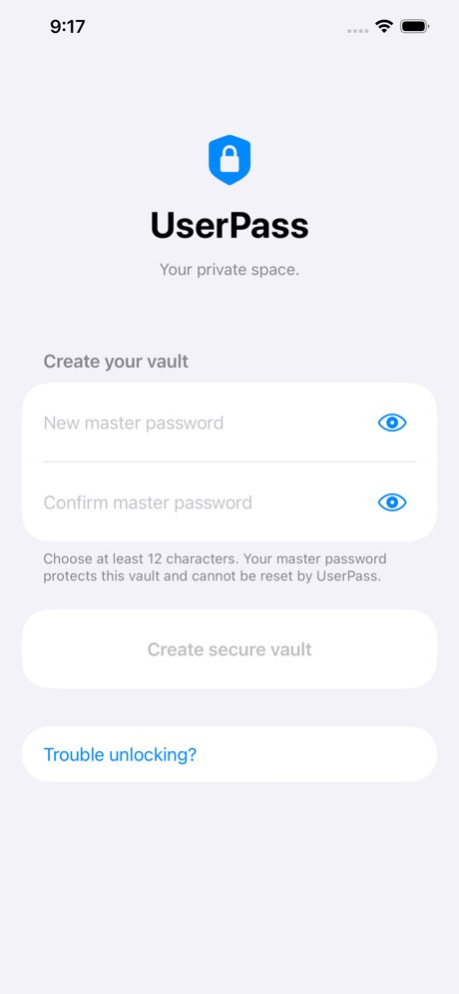
UserPass is a secure private password manager for iPhone. Protect credentials and notes in an encrypted vault secured by your master password. Organize account details, generate strong passwords, and export encrypted...
UserPass is a secure private password manager for iPhone. Protect credentials and notes in an encrypted vault secured by your master password. Organize account details, generate strong passwords, and export encrypted backups. No UserPass account or server storage is required, so your data stays under your control.
Version History UserPass 2.1 improves password generation and everyday vault use. • Password generation now supports lengths from 6 to 128 characters • Added quick copy actions for usernames, client IDs, websites, notes, and other stored fields • Updated password reveal and copy controls with clearer icons • Improved accessibility, iOS 17 compatibility, and overall reliability 2.1 Sep 22 UserPass 2.0 introduces a refreshed interface and stronger protection for your passwords and secure notes. • A new design with improved navigation, dark mode, and support for larger text. • Upgraded vault encryption protects your credentials, account details, and notes. • Export encrypted backups to Files, including iCloud Drive, and restore them using the master password used when exported. • Undo your last restore using the saved recovery copy. • Automatic locking when the app enters the background, with privacy protection for the app switcher. • Improved password generation, masking, and clipboard protection. • Guided migration for existing users and improved setup after reinstalling. • Clearer explanations for backup and recovery options. For existing users: Open UserPass and enter your current master password to begin the upgrade. Follow the prompts to secure your migrated vault, then export a new encrypted backup. UserPass cannot reset a forgotten master password. Keep your password and backups safe. Requires iOS 15 or later. 2.0 Sep 11 *** Critical bug fix for iOS 15 1.4 09/27/2021 *** Bug fixes 1.2 04/08/2015 * Bug fixes 1.1 03/28/2014 1.0 03/12/2014
Previous Versions
Here you can find the changelog of UserPass since it was posted on our website on 2016-10-17 19:57:16.
The latest version is 2.1 and it was updated on 2026-10-09 09:20:10. See below the changes in each version.
UserPass version 2.1
Updated At: 2026-10-08
Changes: Version History UserPass 2.1 improves password generation and everyday vault use.
• Password generation now supports lengths from 6 to 128 characters
• Added quick copy actions for usernames, client IDs, websites, notes, and other stored fields
• Updated password reveal and copy controls with clearer icons
• Improved accessibility, iOS 17 compatibility, and overall reliability 2.1 Sep 22 UserPass 2.0 introduces a refreshed interface and stronger protection for your passwords and secure notes.
• A new design with improved navigation, dark mode, and support for larger text.
• Upgraded vault encryption protects your credentials, account details, and notes.
• Export encrypted backups to Files, including iCloud Drive, and restore them using the master password used when exported.
• Undo your last restore using the saved recovery copy.
• Automatic locking when the app enters the background, with privacy protection for the app switcher.
• Improved password generation, masking, and clipboard protection.
• Guided migration for existing users and improved setup after reinstalling.
• Clearer explanations for backup and recovery options.
For existing users: Open UserPass and enter your current master password to begin the upgrade. Follow the prompts to secure your migrated vault, then export a new encrypted backup.
UserPass cannot reset a forgotten master password. Keep your password and backups safe.
Requires iOS 15 or later. 2.0 Sep 11 *** Critical bug fix for iOS 15 1.4 09/27/2021 *** Bug fixes 1.2 04/08/2015 * Bug fixes 1.1 03/28/2014 1.0 03/12/2014
UserPass version 2.1
Updated At: 2026-09-24
Changes: Version History UserPass 2.1 improves password generation and everyday vault use.
• Password generation now supports lengths from 6 to 128 characters
• Added quick copy actions for usernames, client IDs, websites, notes, and other stored fields
• Updated password reveal and copy controls with clearer icons
• Improved accessibility, iOS 17 compatibility, and overall reliability 2.1 2d ago UserPass 2.0 introduces a refreshed interface and stronger protection for your passwords and secure notes.
• A new design with improved navigation, dark mode, and support for larger text.
• Upgraded vault encryption protects your credentials, account details, and notes.
• Export encrypted backups to Files, including iCloud Drive, and restore them using the master password used when exported.
• Undo your last restore using the saved recovery copy.
• Automatic locking when the app enters the background, with privacy protection for the app switcher.
• Improved password generation, masking, and clipboard protection.
• Guided migration for existing users and improved setup after reinstalling.
• Clearer explanations for backup and recovery options.
For existing users: Open UserPass and enter your current master password to begin the upgrade. Follow the prompts to secure your migrated vault, then export a new encrypted backup.
UserPass cannot reset a forgotten master password. Keep your password and backups safe.
Requires iOS 15 or later. 2.0 Sep 11 *** Critical bug fix for iOS 15 1.4 09/27/2021 *** Bug fixes 1.2 04/08/2015 * Bug fixes 1.1 03/28/2014 1.0 03/12/2014
UserPass version 2.0
Updated At: 2026-09-17
Changes: Version History UserPass 2.0 introduces a refreshed interface and stronger protection for your passwords and secure notes.
• A new design with improved navigation, dark mode, and support for larger text.
• Upgraded vault encryption protects your credentials, account details, and notes.
• Export encrypted backups to Files, including iCloud Drive, and restore them using the master password used when exported.
• Undo your last restore using the saved recovery copy.
• Automatic locking when the app enters the background, with privacy protection for the app switcher.
• Improved password generation, masking, and clipboard protection.
• Guided migration for existing users and improved setup after reinstalling.
• Clearer explanations for backup and recovery options.
For existing users: Open UserPass and enter your current master password to begin the upgrade. Follow the prompts to secure your migrated vault, then export a new encrypted backup.
UserPass cannot reset a forgotten master password. Keep your password and backups safe.
Requires iOS 15 or later. 2.0 6d ago *** Critical bug fix for iOS 15 1.4 09/27/2021 *** Bug fixes 1.2 04/08/2015 * Bug fixes 1.1 03/28/2014 1.0 03/12/2014
UserPass version 1.4
Updated At: 2026-09-10
Changes: Version History *** Critical bug fix for iOS 15 1.4 09/27/2021 *** Bug fixes 1.2 04/08/2015 * Bug fixes 1.1 03/28/2014 1.0 03/12/2014
UserPass version 1.4
Updated At: 2026-09-03
Changes: Version History *** Critical bug fix for iOS 15 1.4 09/27/2021 This app has been updated by Apple to prepare for watchOS 27 compatibility. No new features are included.
*** Bug fixes 1.2 04/08/2015 * Bug fixes 1.1 03/28/2014 1.0 03/12/2014
UserPass version 1.4
Updated At: 2026-08-21
Changes: Version History *** Critical bug fix for iOS 15 1.4 09/27/2021 This update from Apple will improve the functionality of this app. No new features are included.
*** Bug fixes 1.2 04/08/2015 * Bug fixes 1.1 03/28/2014 1.0 03/12/2014
UserPass version 1.4
Updated At: 2021-09-27
Changes: *** Critical bug fix for iOS 15
UserPass version 1.4
Updated At: 2021-09-27
Changes: Sep 27, 2021
Version 1.4
*** Critical bug fix for iOS 15
UserPass version 1.2
Updated At: 2014-03-12
Disclaimer
Official App Store Link
We do not host UserPass on our servers. We did not scan it for viruses, adware, spyware or other type of malware. This app is hosted by Apple and passed their terms and conditions to be listed there. We recommend caution when installing it.
The App Store link for UserPass is provided to you by apps112.com without any warranties, representations or guarantees of any kind, so access it at your own risk.
If you have questions regarding this particular app contact the publisher directly. For questions about the functionalities of apps112.com contact us.